Skip to content
  • Home
  • Emerging Technology & News
  • Computer Help
  • Privacy and Security
  • Reimage Windows Repair
The Reimage Blog
Menu
  • Home
  • Emerging Technology & News
  • Computer Help
  • Privacy and Security
  • Reimage Windows Repair
Facebook Twitter
Home  /  Computer Help  /  Can’t Make That Meeting? Google Slides Now Lets You Pre-Record Presentations
PostedinComputer Help Posted on November 30, 2023

Can’t Make That Meeting? Google Slides Now Lets You Pre-Record Presentations

Posted By Matthew.England

The recording feature is limited to the Chrome browser for now, but you can watch recordings from the Slides mobile app.

Sometimes, you just can’t be present for a presentation, even when you’re the one presenting. If you rely on Google Slides, that’s an easy problem to solve now that Google is rolling out a built-in recording tool.

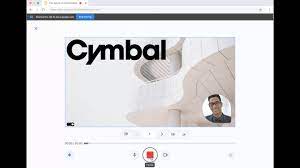
The recording tool works just as you’d expect: open the Slides presentation and hit the new “Rec” button. You’ll need to provide access to your microphone and webcam, of course, but from there you can navigate your slides and record your presentation. When you finish, you can either re-record if things didn’t go perfectly or upload the final result to Google Drive.

Naturally, anything you upload to Drive will count against your storage, but sharing from there is as easy as any other file in the cloud.

You could technically achieve this result before, but only with the help of third-party clients. An all-in-one solution directly from Google is easier and potentially more secure. The recording feature is limited to just Chrome browser for now; you can’t get to it from Android or iOS. You can watch recordings from the Slides mobile app, though. You also must be able to edit the presentation to make a recording, and the final recording needs to be 30 minutes or less.

The new recording feature is rolling out now. However, you’ll need to be on Google Workspace Business Standard, Business Plus, Enterprise Starter, Enterprise Essentials, Enterprise Essentials Plus, Enterprise Standard, Enterprise Plus, and Education Plus to get it. Admins don’t need to do anything to enable the new feature, and depending on the release schedule, you should see the Record button appear in slides before Jan. 2, 2024.

Written by: Josh Hendrickson
Source: PCMag.com
Featured Image: Google

Share on Facebook Share on Twitter
Previous Article
Be careful: There are reports of nasty bugs with the latest Windows 11 update
Next Article
OpenAI Delays the Launch of Its GPT Store

About Author

Matthew.England

Related Posts

  • How to check how much RAM you have

    January 18, 2024
  • 10 Ways to Boost Your Wi-Fi Signal

    January 16, 2024
  • How to put parental controls on YouTube

    December 21, 2023
Scan Now

Categories

  • Business
  • Computer Help
  • Emerging Technology & News
  • Privacy and Security
  • Reviews

Reviews

Reimage Social

Security

Popular Posts

  • PCWorld calls Reimage “A Fantastic Repair Utility “ July 26, 2011 Reviews
  • 4 Ways to Keep the Ghouls & Goblins Away From Your PC October 26, 2010 Archive
  • The PC Key to Happiness - A Properly Maintained OS September 2, 2010 Archive
  • Google says hacked websites were attacking iPhones for years September 12, 2019 Privacy and Security

Random Posts

  • How to use multiple desktops in Windows 10 June 24, 2020 Computer Help
  • Amazon, Apple and Google are always listening: How to opt out and delete your voice recordings November 12, 2021 Privacy and Security
  • Can AI cut humans out of contract negotiations? November 7, 2023 Emerging Technology & News
  • Microsoft to unveil next generation of Windows on June 24 June 4, 2021 Emerging Technology & News
© Copyright 2019
We use cookies to ensure that we give you the best experience on our website. If you continue to use this site we will assume that you are happy with it.Ok